AI Office Action Response Drafting: From USPTO Refusal to Attorney-Ready Draft in Minutes
A trademark office action lands in your inbox. The examiner has cited three registered marks under Section 2(d), flagged your specimen, and requested a disclaimer. The clock starts ticking: three months to respond for most applications, with one three-month extension available for a fee.
 By Howard Katzenberg
Founder, GleanMark
Updated October 10, 2026
A trademark office action lands in your inbox. The examiner has cited three registered marks under Section 2(d), flagged your specimen, and requested a disclaimer. The clock starts ticking: three months to respond for most applications, with one three-month extension available for a fee.
What follows is predictable: hours of research. You pull up each cited mark, compare goods descriptions, search for third-party registrations that might support a crowded-field argument, dig through precedent, draft, revise, and format. For a single Section 2(d) response, the typical attorney spends four to six hours. Multi-issue office actions can consume an entire day.
The research itself is systematic. The arguments follow known patterns. The evidence sits in public USPTO records. What if the mechanical parts -- cited mark lookup, coexistence search, evidence gathering -- happened automatically, leaving you to focus on strategy and client-specific judgment?
That is the premise behind AI-powered office action response drafting: handle the research computationally, rank arguments by historical success rate, and produce a structured first draft that an attorney can review, customize, and file.
Why Office Action Responses Are Ripe for Automation
Office action responses follow a discoverable structure. The examiner identifies refusal grounds. The attorney researches each ground, gathers evidence, selects arguments, and drafts a response that addresses every issue. Within that structure, certain steps are almost entirely mechanical:
Cited mark research. When an examiner cites a mark under Section 2(d), the attorney needs the full picture: owner, goods and services, Nice classes, registration status, prosecution history, and any relationship to the applicant. All public record.
Third-party coexistence search. Demonstrating that the cited mark exists in a crowded field is one of the most effective 2(d) arguments. Finding other registered marks with similar elements that coexist on the register is tedious work -- and it is a search problem with a deterministic answer.
Argument pattern matching. Across hundreds of successful responses, patterns emerge: which DuPont factors matter most for single-word versus multi-word marks, when goods-narrowing amendments are the stronger path, and which argument categories have the highest success rates.
Formatting and citation. A well-structured response follows a standard format. Citations need to be accurate. Every factual claim needs a source. This is where verification matters more than generation.
The parts that resist automation are exactly the parts that require a law license: strategic judgment, client-specific context, and the final review that puts an attorney's name on the filing.
How the Drafting Pipeline Works
The AI response drafting system is a multi-step pipeline, not a single prompt. Each step has a specific job, defined inputs, and verifiable outputs. Here is what happens when you enter a serial number:
Step 1: Parse the Office Action
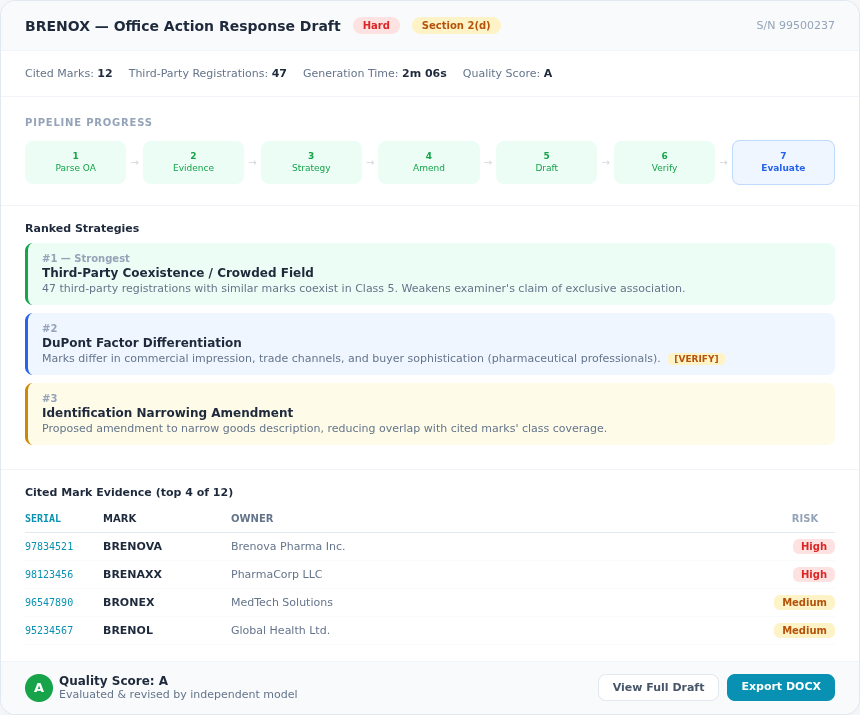
The system fetches the most recent office action from the USPTO prosecution record and parses it to identify every refusal ground, every cited mark, and every requirement. For a mark like IT DEPENDS (S/N 99495288), this step identified a Section 2(d) refusal with 12 cited marks in a single pass.
Across 428 completed drafts, the most common refusal types detected are:
- Section 2(d) likelihood of confusion -- the dominant refusal type, appearing in the majority of substantive office actions
- Identification of goods/services -- the examiner requires clearer or narrower descriptions
- Section 2(e) descriptiveness -- the mark is considered merely descriptive
- Disclaimer requirements -- a descriptive component needs to be disclaimed
- Specimen refusals -- issues with proof of use in commerce
Many office actions contain multiple issues. The pipeline handles compound refusals -- a Section 2(d) refusal combined with a specimen issue and a disclaimer requirement, for instance -- in a single structured draft.
Step 2: Build the Evidence Ledger
This is the anti-hallucination step, and it is the most important part of the pipeline. Before any text is generated, the system queries the USPTO database (nearly 14 million trademark records) to build a verified evidence ledger.
For each cited mark, the ledger includes:
- Registration status, owner, Nice classes, and goods descriptions
- Filing and registration dates
- Whether the cited mark's owner has any relationship to the applicant (common ownership check)
- Class overlap analysis between the applicant's goods and the cited mark's goods
The system also searches for third-party registrations -- marks with similar elements that are currently registered and coexisting on the register. These support the "crowded field" argument, one of the most effective strategies for overcoming a 2(d) refusal.
Every piece of evidence in the ledger gets a unique Evidence ID (EID). When the draft references a fact, it cites the EID. When the draft is finalized, those EIDs are rendered as human-readable citations with links. If the system cannot verify a claim, it does not make it.
Step 3: Develop an Argument Strategy
Using the evidence ledger and data from successful office action responses, the system ranks argument strategies by estimated strength. The ranking considers:
- Historical success rates for the specific refusal type
- Relevance to the particular facts (e.g., whether there is meaningful goods overlap)
- Which DuPont factors favor the applicant
- Whether prior arguments in the prosecution history have already been tried and failed
That last point matters. The pipeline reads the full prosecution history. If a particular argument was already raised in a prior response and rejected, the system avoids repeating it. Strategic avoidance of failed arguments is as important as selecting strong ones.
Step 4: Check for Amendment Opportunities
Before drafting, the system evaluates whether a goods-and-services amendment could resolve or weaken the refusal. If narrowing the identification of goods would eliminate class overlap with a cited mark, the system identifies that opportunity and incorporates it into the draft strategy.
Step 5: Generate the Draft
With the evidence ledger, strategy ranking, and amendment analysis in hand, the system generates a structured response: introduction, argument sections organized by strategy with cited evidence, third-party coexistence tables, a conclusion with requested actions, and [VERIFY] markers on every assertion requiring attorney judgment.
The [VERIFY] markers are a deliberate design choice. The system draws a clear line between what it can substantiate from public records and what requires human judgment. A claim like "the applicant's goods are sold through specialty retailers" cannot be verified from USPTO data -- so it gets flagged.
Step 6: Verify and Repair
After generation, a separate verification pass checks every citation against the evidence ledger. If a draft references a registration number, that number must exist in the ledger. If it references a DuPont factor analysis, the underlying data must support the claim. Unverifiable citations are flagged or removed.
The median generation time across all completed drafts is approximately two minutes. The full pipeline -- from serial number entry to verified draft -- typically completes in under five minutes.
Step 7: Evaluate and Revise
A background worker evaluates the initial draft against a rubric covering accuracy, completeness, and strategic soundness. It identifies the biggest strategic gap and generates a revised version. An independent model from a different AI provider then performs an external quality assessment, with a targeted revision pass if critical issues are found.
The result: a draft that has been generated, verified, self-evaluated, revised, and independently scored before the attorney opens it.
The Research Pipeline: A Deeper Look
The research advisor (available at /oa-research) provides a standalone research interface that runs the evidence-gathering steps independently of draft generation. This is useful when you want to review findings before committing to a full draft.
The research pipeline produces cited mark deep dives (owner details, goods descriptions, prosecution milestones, similarity analysis), third-party coexistence evidence for crowded-field arguments, strategy rankings based on historical effectiveness with case counts and example summaries, and an evidence checklist categorizing what is ready versus what the attorney needs to add.
For each cited mark, the system can also run a full 13-factor DuPont likelihood of confusion analysis, assessing each factor with supporting evidence. This runs asynchronously and typically completes in 60-90 seconds per cited mark.
Who Benefits Most
Solo practitioners and small firms. A four-hour research task becomes a five-minute automated process, freeing time for the strategic judgment that clients pay for.
Prosecution associates. Junior attorneys can use the draft as a structured starting point, learning argument patterns from the system's output while applying their own developing judgment.
IP paralegals. The research advisor pulls together cited mark details, coexistence evidence, and prosecution history summaries in a single workflow -- ready for attorney review.
High-volume practices. Firms handling dozens of office actions per month get consistent quality across responses. The draft serves as a quality floor that ensures nothing gets missed.
What the Output Looks Like
A completed draft is a structured document with clearly labeled sections:
- Refusal type badges at the top so you immediately know what the response addresses
- Ranked argument sections organized from strongest to weakest, each backed by cited evidence from the ledger
- Third-party registration table listing every coexisting mark with registration number, owner, classes, and similarity score -- one recent draft surfaced 47 supporting registrations
- [VERIFY] and [CUSTOMIZE] annotations marking where attorney judgment or client-specific information is needed
- Applicant portfolio evidence for "family of marks" or "common ownership" arguments
- Difficulty assessment explaining favorable and unfavorable factors from the examiner's perspective
- Export to DOCX with a cover page, ready for review and filing
Download Sample Drafts
See real output from the pipeline — download these sample PDFs to review the format, argument structure, and evidence presentation:
| Mark | Serial | Refusal | Difficulty | Sample |
|---|---|---|---|---|
| BRENOX | 99500237 | Section 2(d) | Hard | Download PDF |
| POLYAMINE | 99224407 | Section 2(e) | Medium | Download PDF |
| HYPERCHAT AI | 99464206 | 2(d) + Specimen + Disclaimer | Hard | Download PDF |
For a deeper look at how Section 2(d) refusals work and the argument patterns that succeed most often, see How to Respond to a Section 2(d) Office Action: A Data-Driven Guide. For guidance on descriptiveness refusals specifically, Common Descriptiveness Refusals: How to Overcome Them covers the key strategies. And for a broader view of prosecution trends and which strategies are gaining traction, the TMEP Deep Dive: Office Action Response Strategies That Work provides detailed data.
Getting Started
The OA response drafting tool is available to all subscribers. To generate your first draft:
- Navigate to Draft Response and enter the 8-digit USPTO serial number for any mark with a pending office action.
- You can also select a mark from your portfolio -- the system surfaces portfolio marks with pending office actions and approaching deadlines.
- Click Generate Strategic Draft and wait approximately two to five minutes while the pipeline runs.
- Review the draft on the detail page, work through the [VERIFY] markers, and export when ready.
For more control over the research phase, start at the Research Advisor to review cited mark details, coexistence evidence, and strategy rankings before generating the full draft.
Office action response drafting is included on all paid plans. Starter plans include 1 draft per month. Professional plans include 3 drafts per seat per month. Firm plans include unlimited drafting. See Pricing for details.
To avoid office actions in the first place, run a knockout search before filing. For ongoing protection after registration, set up automated watch alerts to catch new conflicting filings early. And for examiner-style structured searches, see the TESS Search guide.