Trademark Watch Alerts: Automated Monitoring That Catches Threats Early
A competitor files a mark that sounds identical to yours. It publishes for opposition.
 By Howard Katzenberg
Founder, GleanMark
Updated October 9, 2026
A competitor files a mark that sounds identical to yours. It publishes for opposition. The 30-day window to challenge it opens — and closes — while the alert sits buried in a quarterly PDF from your watch service. By the time you see it, the mark is registered, and your enforcement options have narrowed from a straightforward opposition to expensive cancellation proceedings.
This is not a hypothetical. It is how most trademark monitoring still works: batch reports delivered weeks or months after the relevant event, with no way to assess the actual risk a new filing poses to your portfolio.
The Problem: Threats Appear Constantly, and Windows Close Fast
The USPTO processes roughly 900,000 trademark applications per year. Every business day, new filings publish, marks register, and status changes ripple across nearly 14 million records. Somewhere in that daily stream, there may be a filing that conflicts with your mark — phonetically, visually, or in the goods and services it covers.
The challenge is not just volume. It is timing. Several of the most consequential deadlines in trademark practice are non-negotiable:
- 30-day opposition window. Once a mark publishes in the Official Gazette, you have exactly 30 days to file a notice of opposition (or request an extension). Miss it, and the mark registers.
- Office action response deadlines. If your own mark receives an office action citing a conflicting registration, the response clock starts immediately. Understanding what the examiner found — and whether it is a real threat — requires fast access to analysis, not a report that arrives next quarter.
- Assignment and ownership changes. A competitor acquiring marks in your space may signal a broader strategy. Knowing about it in real time lets you respond proactively.
Manual monitoring does not scale. An attorney checking TSDR once a week might catch some of these events, but not reliably — and certainly not across a portfolio of dozens or hundreds of marks. Traditional watch services deliver periodic reports, but the lag between event and delivery is often weeks, and the reports rarely include risk assessment.
Why Automated Monitoring Matters
The economics of traditional trademark watch services have not kept pace with the speed of USPTO data. Monthly PDF reports were adequate when the filing volume was lower and the competitive landscape moved slowly. That is no longer the case.
Automated monitoring solves three specific problems:
Speed. Alerts triggered within a day or two of the USPTO update cut the lag that causes missed deadlines. When a confusingly similar mark publishes for opposition, you need to know that day — not in your next quarterly review.
Coverage. Monitoring a single mark is manageable. Monitoring a portfolio of 50 marks, across multiple Nice classes, with awareness of phonetically similar filings, owner activity, and TTAB proceedings, requires automation. No attorney can manually replicate 35 distinct alert types across thousands of daily USPTO changes.
Context. A raw alert — "new filing NOVVA in Class 009" — creates work. An alert that includes the mark details, owner information, Nice class overlap, and goods and services description lets you triage immediately. The difference between "something happened" and "here is what it means" is the difference between a notification and an actionable intelligence system.
How Watch Alerts Work
Watch alerts scan every new USPTO filing and status change against criteria you define. The system supports four monitoring paradigms, each designed for a different use case.
Portfolio Monitoring: 20 Alert Types for Your Own Marks
When you add a trademark to a portfolio, 20 distinct alert types activate automatically. These cover the full lifecycle of a mark:
- Legal status alerts — office actions received, prosecution events, examiner's amendments, status changes
- Deadline alerts — maintenance filing deadlines at 30-day, 7-day, and 1-day intervals, plus renewal reminders for Sections 8, 9, and 15 filings
- TTAB alerts — new opposition or cancellation proceedings filed, status changes on existing proceedings, new filings in the record
- Ownership alerts — assignments recorded, correspondent changes, entity updates
- Similar mark detection — new filings scored by phonetic, character-level, and Nice class similarity against each mark in your portfolio
Every alert is categorized, and you can configure which types you receive at the account level, the portfolio level, or the individual trademark level. A portfolio of pharmaceutical marks might enable every alert type. A portfolio of legacy marks in maintenance mode might only need deadline reminders. (For the full breakdown of all 20 portfolio alert types, see The Complete Guide to GleanMark's 35 Trademark Alert Types.)
Owner Monitoring: 12 Alert Types for Competitors and Clients
Owner monitoring tracks an entire entity's trademark activity — not just one mark, but every mark they own. This is built for two scenarios:
Competitive intelligence. Track a competitor's portfolio and know the day they file a new application, acquire marks through assignment, or face an opposition proceeding.
Client oversight. If you represent a client with a large portfolio, owner monitoring gives you a single feed covering all their marks — new filings, milestone events (publication, registration, abandonment), and TTAB activity.
To set up portfolio or owner monitoring, visit Watch Services.
Watch Searches: Criteria-Based Surveillance
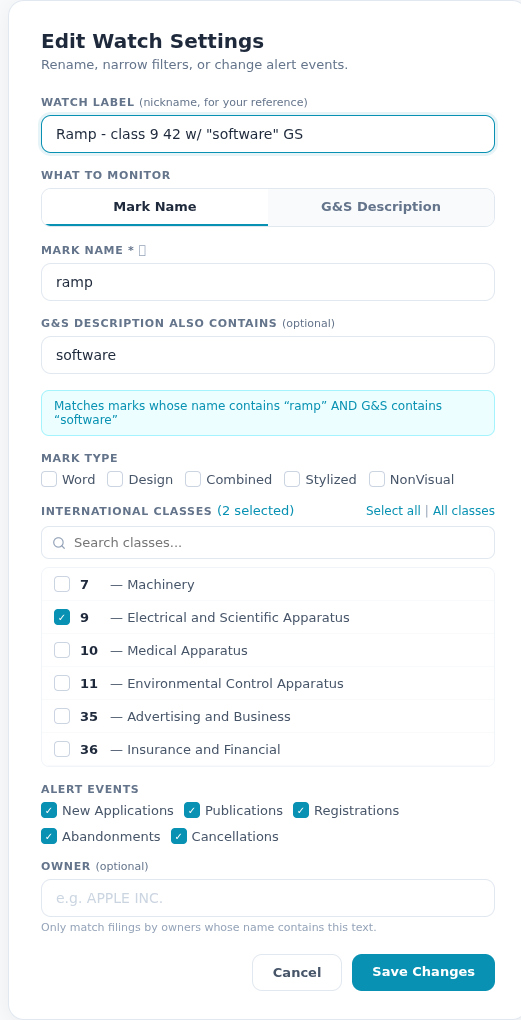
Watch searches are the most flexible monitoring tool. You define a saved search — a keyword, a Nice class, an owner name, a mark type, or any combination — and the system checks every new USPTO event against your criteria.
Five event states are tracked: new filings, publications, registrations, abandonments, and cancellations. You choose which events trigger an alert. A brand protection team might care only about new filings and publications (to catch threats before they register). A competitive analyst might want the full picture, including abandonments that signal market exits.
Watch searches run against the same dataset used for all GleanMark search operations — the full 14 million USPTO trademark records. When a new filing matches your criteria, the alert fires within a day or two.
Similar Mark Detection: Phonetic and Visual Scoring
Similar mark detection goes beyond keyword matching. When a new mark is filed, the system evaluates it against every mark in your portfolio using three scoring dimensions:
- Phonetic similarity — Metaphone-based sound comparison that catches marks like NOVVA/NOVA, KLEAR/CLEAR, or FYND/FIND
- Character-level similarity — Levenshtein and trigram analysis for visual similarity (marks that look alike on paper)
- Nice class weighting — Matches in the same or related classes receive higher threat scores than marks in unrelated goods categories
This combination surfaces threats that keyword monitoring would miss entirely. A watch for the exact word "NOVA" would not catch "NOVVA" or "KNOVA." Phonetic scoring does.
What Happens When an Alert Fires
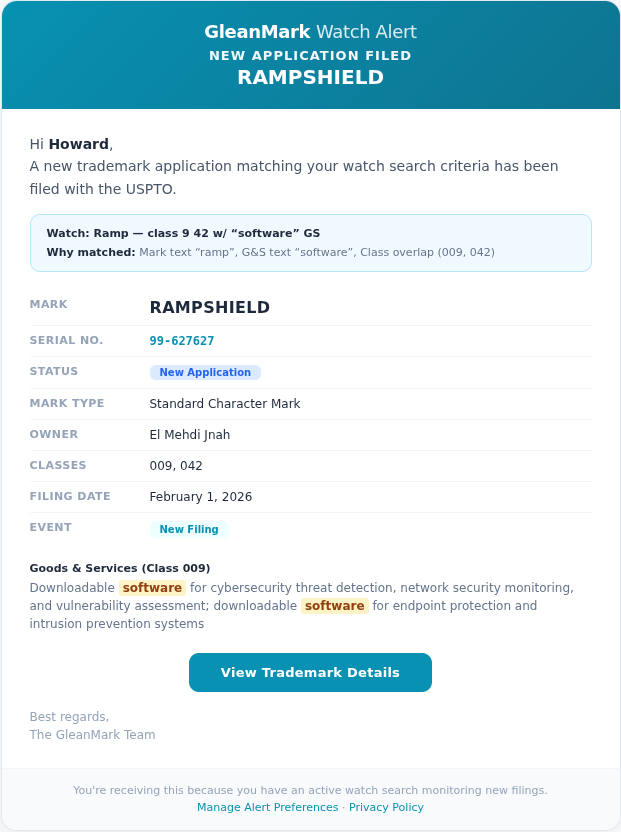
Every alert includes the information you need to act:
- Mark details — the mark text, serial number, filing date, owner, and current status
- Match context — why this alert fired (which watch criteria matched, which portfolio mark is potentially affected)
- Goods and services — the full G&S description with matched keywords highlighted
- Nice class overlap — which classes the new filing shares with your monitored marks
- Direct links — one click to the full trademark detail page, prosecution timeline, or similar marks analysis
Alerts are delivered via email (with the full details inline — no login required to read them) and stored in your in-app alert inbox for later review. You can filter, sort, snooze, and bulk-manage alerts from the inbox.
For marks that warrant deeper investigation, you can launch a DuPont likelihood-of-confusion analysis or review the Similar Marks tab directly from the alert — turning detection into assessment in one click.
Who This Is For
In-House Counsel and Brand Managers
You manage a portfolio of marks and need to know when threats appear. Watch alerts give you same-day coverage across new filings, status changes, and competitor activity. The alerts that are clearly irrelevant can be dismissed quickly. The alerts that look serious can be escalated to counsel with the full context already attached.
Outside IP Counsel
You manage monitoring for multiple clients, each with different risk tolerances and portfolio sizes. Portfolio monitoring with per-client alert configuration means each client's marks are tracked with the right level of sensitivity. When a client asks "should we be worried about this filing?" the alert detail page provides a structured starting point — owner info, class overlap, goods comparison, and prosecution history.
Solo Practitioners and Small Firms
Traditional watch services price monitoring per mark, per month. At scale, this becomes prohibitive for smaller practices. Automated monitoring across a full portfolio consolidates what used to require a watch service subscription plus manual review time into a single workflow. (For a broader comparison of how different platforms handle monitoring, see Best Trademark Search & Monitoring Tools in 2026: An Honest Comparison.)
Getting Started
Setting up your first watch takes under two minutes:
-
Add marks to a portfolio. Navigate to Alert Settings and add the trademarks you want to monitor. All 20 portfolio alert types activate automatically.
-
Configure alert preferences. Choose which alert categories matter for each portfolio — legal status, deadlines, TTAB, ownership, similar marks — and set your preferred notification channel (email or in-app).
-
Create watch searches. Define saved searches for criteria-based monitoring: a keyword in your industry, a competitor's name, a Nice class you want to track. Choose which events trigger alerts (new filings, publications, registrations, abandonments, cancellations).
-
Track owners. Add competitors or key market players to owner monitoring. You will know the same day they file a new application, complete an assignment, or face a TTAB proceeding.
-
Review and triage. Alerts land in your inbox with full context. Dismiss low-risk items, escalate high-risk ones, or launch a deeper analysis directly from the alert detail.
Watch alerts are available on GleanMark Professional and Firm plans. Visit Pricing to see plan details and start a free trial.
For pre-filing clearance, start with a knockout search to identify conflicts before they become office actions. If you need to respond to a Section 2(d) refusal, the AI office action drafting tool researches cited marks and generates attorney-ready arguments. And for examiner-grade structured searches, see the TESS Search guide.