Your trademark docket
builds itself.
GleanMark reads each mark's USPTO prosecution history and dockets every deadline automatically — office actions, Statements of Use, §8 / §9 / §15, and renewals. No spreadsheets, no data entry.
It even clears each deadline on its own when the USPTO shows you've filed.
7-day Professional trial · No credit card · Computed from 14M USPTO records, refreshed daily
12
USPTO deadline types, tracked automatically
0
Spreadsheets to maintain
Daily
Digest email of what's due
14M
USPTO records, refreshed daily
Set it up once. It runs itself.
From a tracked mark to a self-maintaining docket in four steps.
Add your marks once
Monitor a portfolio or track owners. Every live application and registration you follow is docketed automatically — no matters to key in, no dates to type.
Deadlines appear from USPTO data
GleanMark reads each mark's prosecution history and derives the real action dates — office action responses, Statements of Use, §8 / §9 / §15 maintenance, and renewals — then keeps them current as the record changes.
Each one clears itself when you file
When the USPTO records your filing, GleanMark reads the event and marks the deadline satisfied — so your overdue list reflects reality instead of crying wolf.
You just get reminded
Reminders at 30 days, 7 days, and the day before — by email and in-app alert — plus a daily digest of what's overdue, due today, and coming up.
It knows when a deadline is met — not just when it's due.
Most docketing systems track due dates and rely on a person to tick “filed.” GleanMark closes the loop: the moment the USPTO records your Statement of Use, §8 Declaration, or renewal, it reads the event and clears the deadline automatically — so your overdue list reflects reality, not stale reminders.
It's derived from the USPTO record, and you stay in control — every item is reviewable against the underlying filing.
See your docket — and what lands in your inbox
Real GleanMark output: the digest email, and deadlines it computed for real, public USPTO filings.
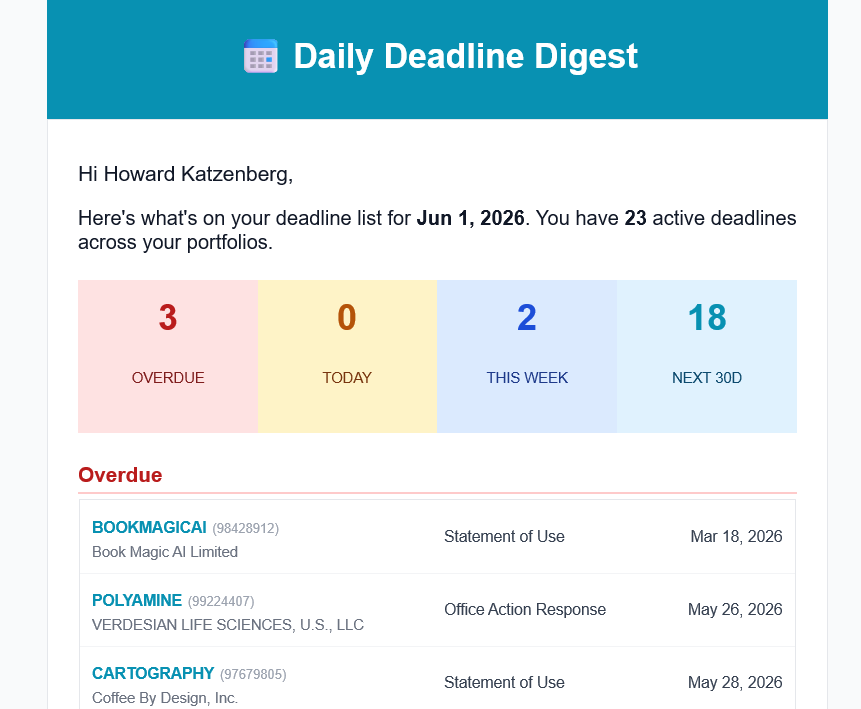
A daily digest, in your inbox.
Every morning, GleanMark emails you what's overdue, due today, due this week, and coming up in the next 30 days — across every portfolio you manage. Reminders also fire 30, 7, and 1 day before each due date.
One company's deadlines, at a glance.
Every deadline on a set of marks in one view, grouped by how soon it's due, with the ones already filed cleared off. Here are real deadlines on Microsoft's marks as GleanMark computed them on September 26, 2026, including two that cleared themselves when the USPTO recorded Microsoft's filings.
Upcoming deadlines
Microsoft Corporation
as of Sept 26, 2026
Next 30 days3
- WINDOWS 11
Office Action Response · 90792743
Oct 13
- SEEING AI
Statement of Use · 98707928
Oct 21
- MAGENTIC
Statement of Use · 99170656
Oct 21
31-60 days3
- MINECRAFT BLAST
Office Action Response · 99709301
Oct 30
- POWERAPPS
§8 & §9 Renewal · 86750540
Nov 2
- M365
Statement of Use · 99271358
Nov 12
Cleared this month2
- AZURE SPHERE
§8 & §15 Declarations due Sept 29
Filed Sept 16per the USPTO
- TOUCHBACK
§8 & §9 Renewal due Oct 5
Filed Sept 16per the USPTO
A selection from Microsoft Corporation's public USPTO record. Microsoft isn't a GleanMark customer. Put marks in a portfolio and GleanMark works out their deadlines the same way.
Spreadsheets and manual dockets vs. GleanMark
No credit card · Included on Professional & Max
Twelve deadline types, tracked automatically
Computed from USPTO prosecution data — plus any custom or foreign deadlines you add yourself.
Office Action response
3 months from issuance, plus the one-time extension
Statement of Use & extensions
6-month window after the Notice of Allowance, with extensions
Opposition period
30-day window to oppose after publication
TTAB proceeding deadlines
Opposition and cancellation dates where your mark is a party
§8 Declaration of Use
Years 5–6 maintenance filing
§15 Incontestability
Eligibility window in years 5–6
§8 & §9 Renewal
First renewal in years 9–10
§8 & §9 Subsequent Renewal
Every 10 years after — years 19–20, 29–30…
Paris Convention priority
6-month foreign-filing priority window
Post-Registration Office Action
Six months from issue — missing it cancels the registration
ITU Notice response
30 days to cure an ITU unit notice on an extension, SOU, or divisional
Madrid Protocol renewal
WIPO’s own 10-year term from the international registration date, plus the six-month grace period
Custom & foreign deadlines
Add your own filing, client-meeting, or national-office dates
Then slice your docket any way you need
Built for how firms actually work
Auto-clears completed filings
When the USPTO records your filing, the deadline is marked satisfied automatically — no manual close-out.
Reminders before every due date
Warnings at 30 days, 7 days, and the day before — by email and in-app alert — plus a daily digest.
List & calendar views
Switch between a sortable list and a month calendar. Your preferred view is remembered.
Export to your calendar
One-click .ics export to import every deadline into Outlook, Google Calendar, or Apple Calendar.
Powerful filtering
Filter by urgency, deadline type, client, or portfolio, and search by mark, serial, or owner.
Team-ready actions
Complete or snooze for the whole team or just yourself, with bulk actions across many marks at once.
Already run a docketing system?
Switching usually means re-keying your whole portfolio. With GleanMark, there's nothing to re-key — so you can replace or layer.
Run end-to-end on GleanMark
For a trademark-focused practice, point GleanMark at the marks you already own and the docket builds itself in minutes — then stays current on its own. Docketing, search, clearance, OA, and monitoring in one tool.
Layer it on the system you keep
Keep your firm-wide system and let GleanMark compute the USPTO deadlines for your marks independently — a second set of dates to check yours against — and add the search, clearance, and monitoring dedicated dockets weren't built for.
Frequently asked questions
Related on GleanMark
Never miss a trademark deadline again.
Put your portfolio's deadlines on autopilot — built from USPTO data, cleared when you file. 7-day Professional trial, no credit card required.
Start Free Trial