GleanMark Is Now in ChatGPT: Trademark Answers From the USPTO Register
GleanMark is now in ChatGPT's plugin directory. Install it and ChatGPT can answer trademark questions from the USPTO register, with serial numbers and links to each record. Public research needs no account.
GleanMark is now listed in ChatGPT's plugin directory. The listing was published on October 8, 2026, and GleanMark is the first trademark plugin there that can search the case files of the Trademark Trial and Appeal Board, the USPTO's internal court for trademark disputes, and read the filings in them. Those files show who is fighting over which mark, what each side filed, and where the case stands. Install it, and ChatGPT can answer trademark questions from USPTO records: about 14 million trademark applications and registrations, and more than 290,000 oppositions and cancellations at the Board, updated daily from USPTO data. Looking up public records needs no GleanMark account.
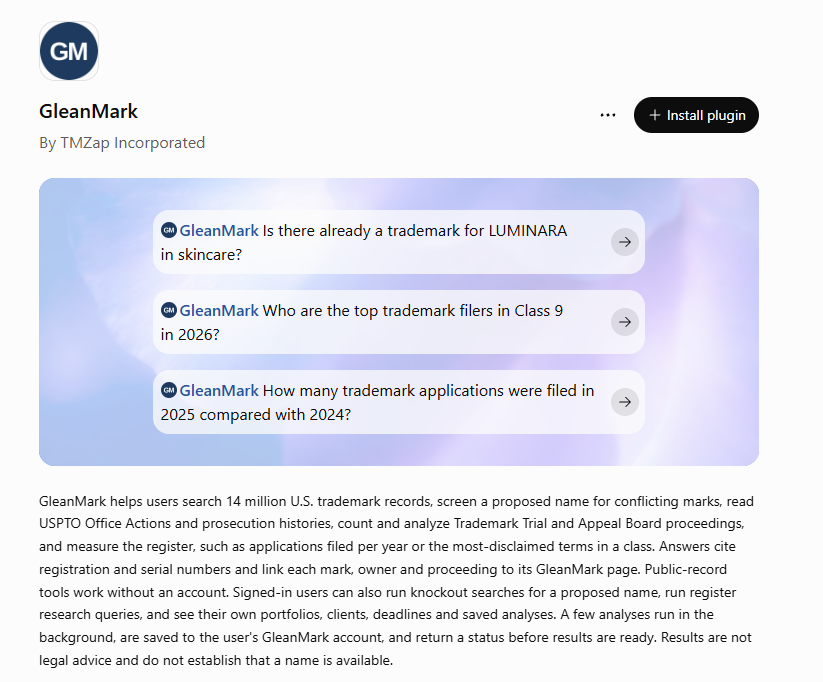
GleanMark explains the public USPTO record. It is not a law firm, its answers are not legal advice, and no search result establishes that a name is available.
Installing It
- Open GleanMark's listing in ChatGPT and click Install plugin. The listing shows the publisher as TMZap Incorporated, the company behind GleanMark.
- ChatGPT offers to sign in to GleanMark. Continue without signing in to look up public records, or sign in with your GleanMark account (see What Signing In Adds, below).
- Start a new conversation, select GleanMark or @mention it, and ask a trademark question.
If GleanMark does not appear when you browse the directory, use the listing link above or search the directory for GleanMark.
What You Can Ask Without an Account
- Marks: search by word or serial number, and read a mark's owner, goods and services, classes and status.
- Owners and law firms: who owns a mark, what else that owner has filed, and which firms file for them.
- File histories: an application's dated record, from filing through Office Actions (the USPTO's letters about an application), responses, and status changes.
- Refusals: why an application was refused, and which registration the USPTO examiner cited.
- Cases at the Board: oppositions, which object to an application, and cancellations, which ask the Board to remove a registration, found by party name, proceeding number, or a mark's serial or registration number.
- Register counts: applications filed per year, month or day, and the top filers in a Nice class (the international system that sorts goods and services into 45 classes).
A few questions to start with, taken from the listing and our integrations page:
- "How many trademark applications were filed in 2025 compared with 2024?"
- "Who are the top trademark filers in Class 9 in 2026?"
- "Why was U.S. trademark application serial 99458124 refused, and which registration was cited?"
Answers cite serial and registration numbers and link each mark, owner and proceeding to its GleanMark page, so you can open the record behind each cited fact.
A Worked Example: SABII
Most trademark questions come down to one record, and one record usually leads to the next. Here is the file behind the third question above.
On October 23, 2025, Sabii, LLC applied to register SABII for beauty creams, lotions, skin serums and lip balm in Class 3. On March 11, 2026, the USPTO examiner assigned to the application refused it for likelihood of confusion, meaning shoppers could mistake one brand for the other. The examiner cited SABI, Registration No. 2,232,458, registered on March 16, 1999 for eau de cologne, hand lotions and body creams and owned by Sandawana Holdings Ltd.
Sabii did not respond in time, and the application was abandoned on June 25. On July 15, Sabii got it reinstated (revived, in USPTO terms) and filed its response. The same day, it asked the Board to cancel the SABI registration in proceeding 92092280. On August 12, the examiner suspended Sabii's application, putting it on hold until the Board case is resolved. On September 25, at Sandawana's request and with Sabii's consent, the Board suspended the cancellation case too while the two sides negotiate a settlement.
Ask GleanMark about serial 99458124 and each of those steps comes back as a USPTO record: the Office Action with its likelihood-of-confusion ground and the cited registration, the dated file history, the Board case, and the suspension letter itself. That letter names Cancellation No. 92092280 and says why the application is waiting: "Because the outcome of this proceeding(s) could directly affect whether applicant's mark can register, action on this application is suspended until the proceeding(s) is resolved." Each result links to the GleanMark pages for both marks and for the Board case.
What Signing In Adds
Account holders on Professional, Max or Enterprise plans can sign in. Create an API key in GleanMark under Account Settings (in your profile menu), in the API access section, then paste it on the GleanMark page ChatGPT opens when you choose to sign in. Signing in adds:
- Knockout searches: a ranked screen of existing marks that could conflict with a new name, with registration numbers, owners and goods. It is a screening aid, not a legal opinion.
- Your own workspace: your portfolios, clients, deadlines and alerts.
- Deeper research tools: a factor-by-factor look at whether two marks could be confused, how many similar marks already share the register, and a search of the Board's written decisions.
What It Does Not Do
- It cannot file, edit, delete or pay for anything. When you are signed in, four research tools save their analysis to your own GleanMark account so you can come back to it. Every other tool only reads.
- It does not read your chats. GleanMark receives only what ChatGPT sends to look up an answer, such as a mark or a serial number. It never reads your ChatGPT history, memory or uploaded files.
- No in-chat cards. Answers come back as ChatGPT's own text and tables, with links to each record.
Claude and Other AI Assistants
GleanMark also works in Claude, added as a custom connector; see the Claude setup guide. Assistants that connect to remote servers through the Model Context Protocol, an open standard for connecting AI assistants to outside data, can use the same endpoint, https://gleanmark.com/mcp. Setup for each is on the integrations page.
Related Features
Related Articles
Board dismisses Inmode challenge to Empower Aesthetics design application
October 22, 2026
Board cancels Storyteller Overland’s two clothing registrations for lack of use when it applied
October 20, 2026
Zhang keeps MEN WITH THE POT registration because both cases rested on the same facts
October 15, 2026